
Software · free to download
Bench Buddy
A bench assistant for clock and watch repair. Document every job step by step, time the movement, keep track of parts, movements and customers, and keep all of it on your own computers and network.
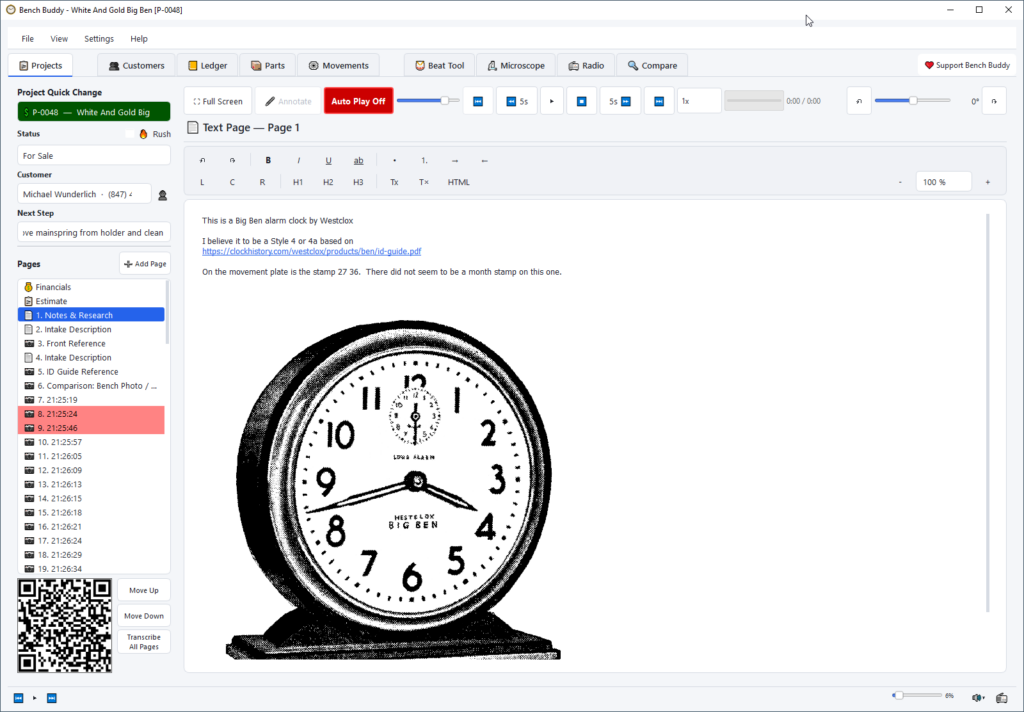
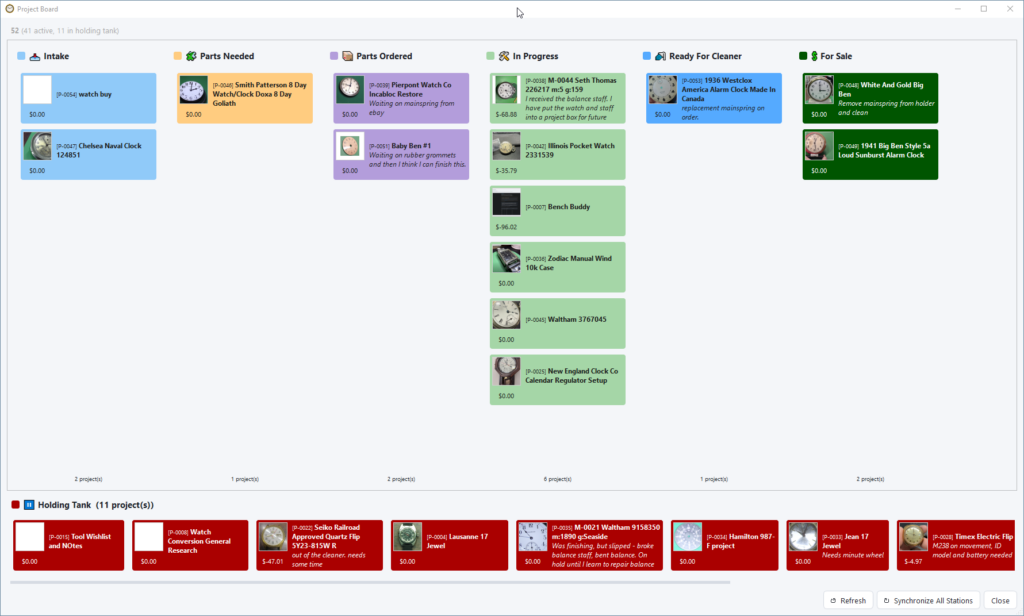
Keep a list of all your projects and see the work on a single view with the built in Project Board view.
Keep multiple workstations in sync, while keeping all your data local. No cloud subscriptions or huge storage fees. Don’t hold back, capture all your work that may be helpful with abandon. If you need to tidy up some disk space, use the built in media manager.
Bench Buddy is offered absolutely free. If you get value, and I think you will, please consider supporting the project financially.
Windows · macOS · Linux · No account · No Clouds Required! Local-first

Why it exists
Built at the bench, for the bench
I wanted one place for the photos I take going down, the notes I make throughout the process, the timing results, the parts I ordered and what the customer owes. I wanted to easily re-use my research when a similar timepiece came to the bench. Nothing did all of it without a subscription or a cloud account, so I built it.
Your data stays homeA local database and plain media folders you can browse yourself. No cloud account.
Mouse, trackball or pedalRecord, annotate and review with minimal keyboard use, so your hands stay near the work.
Multiple machines, one recordSync a desk PC and a bench PC over your own network, or carry a sync file on a USB stick. Pro shop? Install it at every workstation and sync them all! Your data stays local, hosted on the “Leader”
Features
What it does
Document every repair
Each job is a numbered project, P-0001 onward, with its steps in order like slides.
Projects and stepsPhoto with narration, video, timelapse and snapshot steps, plus a Notes & Research page for serials, measurements and links.
Narration and transcriptionTalk while you work; optional faster-whisper turns narration into text.
AnnotationArrows, numbered circles, text, shapes with undo and redo.
The original image is always kept.
Publish the recordExport a job to PDF, Word or a portable ZIP, or publish it to WordPress to share your work. Curate which project images/steps are included so your private notes stay private.
Instruments at the bench
A contact microphone and the app replace a shelf of single-purpose gadgets.
Clock calibrationRun using the measured BPH and time passed on the dial, Bench Buddy can help you to “dial in” on the most accurate timekeeping possible for your clocks.
Beat Tool for clocksLive BPM/BPH and beat error for clock escapements, with audio monitoring and waveform charts. Get in beat easily, listen to the beat with the amplification feature if you prefer doing it by ear, or use the visual display and graphing to dial it in.
MicroscopeLive view from a ToupTek or compatible camera, with zoom, snapshots, video and annotation straight into the project. Combine webcam with Microscope to get picture-in-picture image captures.
Know what’s on the shelf
Parts and movements you can actually find again.
Parts inventoryExact counts or lots, with photos, maker and type, and Place → Container → Slot locations. Thermal label printer (Phomemo M110 tested) compatible label printing.
Valuation and reportsRecord value research with sources, print movement labels, export movement reports to PDF.
Movement catalogueMaker, grade, serial, size, jewels, dates and condition.
Smart Snap (optional)Photograph a part and have AI suggest what it is and roughly what it sells for, using your own Anthropic API key. Nothing runs unless you ask.
Run the shop
The paperwork side of a one-person bench.
Customers and intakeContact records, service history and a structured intake that records the item and its condition.
LedgerIncome and expenses, shop-wide or per job, with a running balance. Import eBay purchases and sales with duplicate protection.
Work EstimatesQuickly prepare estimates with pre-loaded templates for many major bench tasks. Full service templates and individual task templates. You provide your labor rates and BB helps you prepare an estimate for your customer.
LabelsConfigurable project, movement and inventory labels for print or thermal printers. Tested with Phomemo M110 thermal printer.
Reference and comfort
Small things that make long bench sessions easier.
Phone captureScan a QR code to add photos to a project or inventory straight from your phone over your network.
Hands off the keyboardBind a USB foot pedal, presenter remote, Bluetooth shutter, mouse buttons or shortcut keyboards to capture and playback actions, keeping your bench clutter free and your hands near the work.
Internet radioA player in the status bar, with favourites, for those heads-down moments. Give the Lounge hits a try for a groovy 50’s vibe.
Download
Get Bench Buddy
Download, unzip and run. Bench Buddy checks for updates at startup and can install them for you. It’s in active development, so update often, and keep every synced station on the same version.
Windows
Windows 10 and 11 (64 bit)
Download, unzip, run
Supports auto updating
macOS
macOS 13 Ventura or Later
Download, unzip, run
Supports auto updating
NOTE: macOS currently requires some additional setup. Please read the guide linked below.
Linux
Debian 12 Tested.
Other Debian-based systems such as Ubuntu should work but are untested
Download, unzip, run
Supports auto updating
Helpful accessories
- Microphone (for the Beat Tool): any mic connected to your computer that can clip onto the movement or sit right next to it. In a noisy room, a clip-on piezo contact microphone works best because it picks up the tick through the case instead of through the air. They’re inexpensive on Amazon and elsewhere.
- Webcam (for Projects): Projects works best with at least one webcam. You can connect several and switch between them for different angles.
- Microscope camera (optional): capture straight from your microscope into a project. So far it’s tested only with AmScope cameras.
- Bench Buddy also supports project page capture with a foot pedal, presenter remote, 3/4 button keyboard or Bluetooth camera shutter contol. These shortcut devices make capturing project work faster and keeps your hands nearer to the work and less off the bench while working.
Support
Free to use. Supporters welcome.
Every feature is free. Now and then Bench Buddy will ask if you’d like to support development. Say no and it keeps working exactly the same.
If it saves you a balance staff, consider buying one for the next person who opens it.
Report a bug or suggest a feature
Issues and pull requests are welcome on GitHub. The code is public so you can read it, build it and send improvements back.
Questions
Common questions
Is it really free?
Yes. Compiled releases are free to download and run for personal or shop use. The occasional supporter reminder is the only ask. If you choose to support Bench Buddy at one of our supporter levels you will get a supporter code you can enter. It hides the startup support request and the support buttons in the app for a year. After that you can support again or continue using for free, but we really appreciate the ongoing support!
Is it open source?
No. At this time I am not opening the source or sharing it.
Where is my data stored?
On your computer, in a local database with your photos, video and audio in ordinary folders. Nothing goes to a cloud service unless you turn on an optional integration. This makes Bench Buddy’s work very compatible with other tools such as Immich for photo management, indexing and searching.
Do I need a webcam or microscope camera?
No. Notes, pasted images, inventory, the ledger and the timing tools all work without one. But the main purpose of the projects page feature is to help you capture the problems as you see them, catalog the work to be done, and support you when you can’t remember QUITE where something goes back.
Does it use AI?
Only if you add your own Anthropic API key and press the button. Smart Snap and value research are optional, user-triggered and reviewable. OCR of images is also powered by an AI key.
Can I use it on multiple computers?
Yes. Peer-to-peer sync finds other Bench Buddy stations on your network, or you can export a sync bundle to a USB drive. You can use it on your network at up to many stations. You designate one station to be the Leader – this station becomes the authority for any conflicts and resolves them. It also holds the full set of media and data. If you want to back up a terminal – this is the one to do it on. But if you run multiple stations and do full syncs this creates a natural redundancy in your network.